Your whole interior studio, in one place.
Designs, approvals, tasks, quotes and invoices for interior designers and architects. Your client gets one private link.
- 30-day free trial
- No card needed
- Files stay in your Google Drive
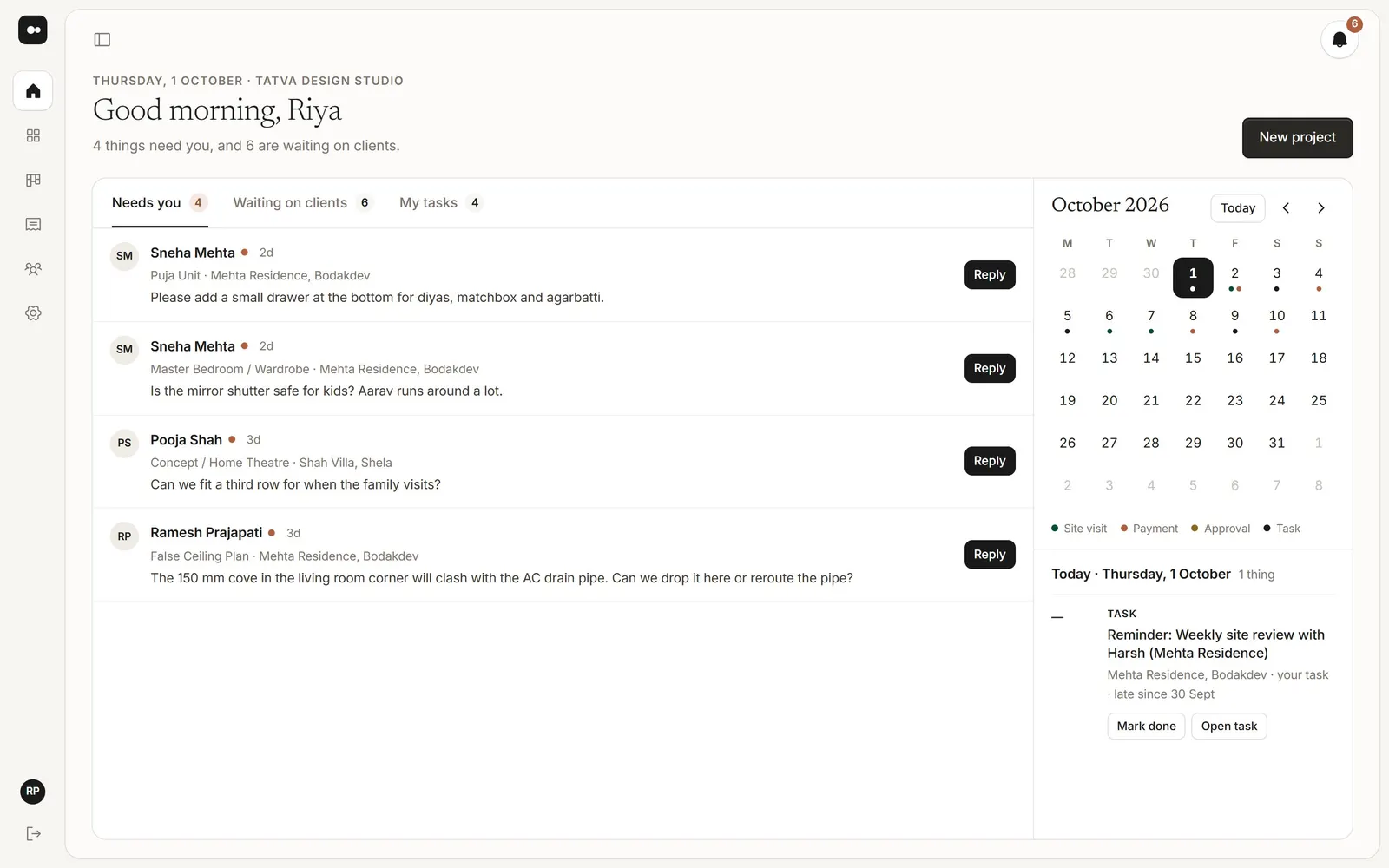
What needs you today, and what clients are waiting on.
Works with what you already use
Google DriveWhatsAppAny emailPDF drawing setsAny phoneClaude and ChatGPTEverything your studio runs on.
From the first enquiry to the last invoice, the whole project lives in Plott. No more five apps and a spreadsheet.
Every new lead in one list, with the next follow-up on it.
Build a deck from the project’s files. Show it or send a PDF.
Clients pin notes on the design and approve each version.
A quote becomes an invoice, right next to the project.
One board for the studio. Client notes turn into tasks.
Purchase orders to your carpenter or supplier, from the project.
Same day. Much less chasing.
Five moments every studio knows, before Plott and after.
- 9:30 amMorning
A new enquiry comes in
WhatsAppBeforeHi, saw your work on Instagram. 3BHK in Baner, can we talk?Buried under forty other chats by lunch.
PlottWith PlottKulkarni, 3BHK BanerEnquiry · from InstagramFollow up todayAdd it to Enquiries with the next follow-up date on it.
- 11:00 amLate morning
Send the new renders
WhatsAppBeforeIMG_4021.jpg … IMG_4060.jpg (40 photos)“Which one is the final?” Full-size files, free to forward.
PlottWith Plottmehta-residence.plott.workLiving room · Rev C · 12 rendersWatermarkedOne private link, straight from your Google Drive folder.
- 1:00 pmAfternoon
The client replies
WhatsAppBeforeThe left one, but lighter? Not that left 😅 Will send a voice noteScreenshots with arrows, and guessing what they meant.
PlottWith PlottPin 3 · “Make this wall lighter”Amit Mehta · on Living room Rev CTask for RiyaNotes sit on the exact spot and turn into tasks for your team.
- 4:00 pmSite and vendors
Order for the site
SpreadsheetBeforePO_final_v3 (2).xlsxRaj Carpentry · ₹ ?Typed in a spreadsheet, then a photo of it on WhatsApp.
PlottWith PlottPO to Raj CarpentryMehta Residence · ₹86,400Ready to sendMake the PO from the project, then send it to the vendor.
- 7:00 pmEvening
Getting paid
PhoneBeforeCalling about the second payment. Again.Invoices in one file, payments remembered in your head.
PlottWith PlottTax invoice 031 · ₹1,18,000Made from the approved quoteReminder setSend the invoice, and a reminder turns up on the due date.
7:30 pm. The laptop is closed.
The day’s work is done and written down, and tomorrow is already on the board.
- Clients open one linkNot forty files in a chat. Always the newest version, with your name on it.
- Your team knows what’s nextEvery note is a task with an owner and a date, so nobody has to ask.
- Everything is on recordWho approved which version, and when. Every quote, PO and invoice by the project.
- Amit approved Living room Rev C2:40 pm
- Riya made the wall lighter and replied to Amit’s note3:15 pm
- PO to Raj Carpentry sent4:20 pm
- Tax invoice 031 sent to Amit6:50 pm
Your designs and your clients stay private.
Your work is encrypted, your files stay in your Drive, and every person sees only what you allow.
Your data travels over HTTPS and is stored encrypted on Cloudflare.
Email passwords and keys you save are encrypted again, never shown back.
Plott only views the folder you share. Nothing in your Drive changes.
Each client sees only their own link. Roles decide who sees money.
Plott never takes or holds your clients’ payments. You only record them.
Send your first link today.
No migration, and nothing for your client to learn.
Add Plott as a Viewer on the project folder. Nothing is copied or moved.
Their name and email. Plott keeps them in your contacts for the next project.
By email, or on WhatsApp. They open it on any phone, with no password to remember.
Ask Claude or ChatGPT what’s waiting on a project.
Connect Plott to Claude, ChatGPT or any app that takes an MCP connector. It reads your projects, tasks, approvals and invoices, and drafts tasks, quotes and POs. You check them and send them.
Priced per studio, not per seat.
Free for 30 days, no credit card. Prices in INR, before 18% GST.
For one designer running their own projects.
- 5 projects
- Just you
- 10 clients per project
- Pins, versions and approvals
- Reminders
A small team sharing one board and one set of clients.
- 25 projects
- 5 team members
- 25 clients per project
- Watermarked previews
- Documents to sign
An established practice: as many projects and people as you need.
- 100 projects
- 20 team members
- 25 clients per project
- Everything in Studio
What studios ask first.
Do you copy my Google Drive files?
No. You share the folder with Plott as a Viewer. Nothing in your Drive is copied or changed, and your files stay named the way you named them.
Does my client need an account or an app?
No. They open one link on their phone or laptop. The link you email signs them straight in; later, a six-digit code by email gets them back in.
Can my clients download the originals?
Not unless you let them. Previews carry your studio name burned into the picture, so a screenshot carries it too. Switch it off once they have paid.
Can different clients see each other’s notes?
By default, yes: everyone on a project sees its notes and replies, with each person’s name. Switch it off in Settings and each person’s notes stay private to them and your studio. Your team’s own notes never reach clients.
Can I show PDFs and floor plans?
Yes. A multi-page PDF opens page by page in the browser, with no download. Sheet numbers and revisions are read from the file name.
Does Plott make GST invoices?
Yes. Quotes and invoices work out CGST and SGST, or IGST for another state, from your GSTIN and your client’s address. If you aren’t registered for GST, you can leave it out.
Can my team work in it too?
Yes. Invite people as Owner, Designer or Accounts. Notes, tasks and reminders are shared across the studio.
Can Plott replace our task spreadsheet?
Yes. Tasks for every project, and for the studio itself, sit on one board with an owner and a due date, as a board or a list. Client notes can be added to a task, and reminders turn into tasks on the day.
Can clients see our tasks and team comments?
No. Tasks, team comments and reminders are only for your studio. Clients see their designs, notes, approvals, documents and invoices on their link.
Can I use Plott from Claude or ChatGPT?
Yes. Add Plott as a connector in Claude, ChatGPT or another app that takes MCP connectors, and allow it on your studio. It can look up your projects, tasks, approvals and invoices, and draft tasks, quotes and POs. It never sends anything to a client or vendor and never records a payment. Disconnect it in Settings at any time.
What happens to my files if I cancel?
Your files were never ours. They’re in your Drive, named the way you named them. The link stops working; nothing else changes.
More answers in the Help Centre.
Your next client gets one link.
Share one project folder with Plott and send the link today.
MIN20Talk to us for 20 minutesPick a time that suits you, in IST